Atomic Note — a voice-first e-ink notes device
A pocket e-paper device you talk to. Hold a button, say a thought or an expense, and a fully local pipeline files it into an Obsidian vault you can then ask questions of — out loud, with no cloud.
- capture
- ~5 s
- speak → filed note
- ~15 s
- flash used
- 40%
- input
- 2 buttons
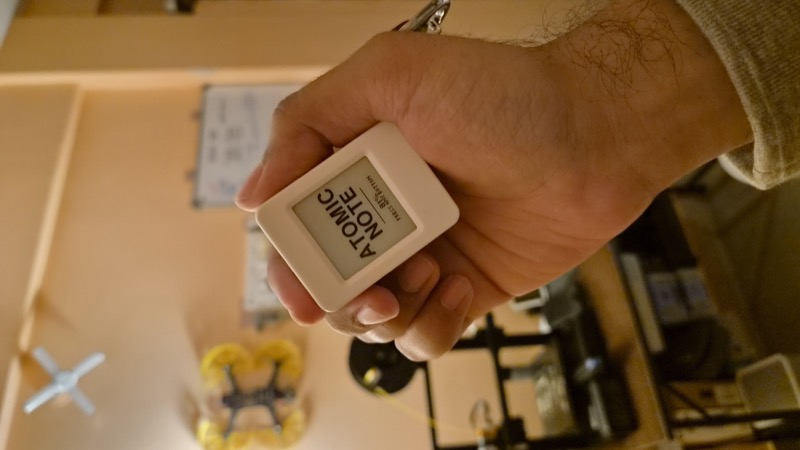
Atomic Note is an ESP32-S3 device with a 1.54" e-paper panel and two buttons. Speak into it and a companion service on a Mac transcribes, structures and files the note — transcription, understanding, retrieval and speech all run locally. It tracks expenses, links notes that follow on from each other, and unlocks extra apps when you plug a sensor in.
Personal project — a pocket e-paper device you talk to. Hold a button, say a thought or an expense, and it becomes a structured, searchable note.
Status: working ✅ · daily driver · 40% flash, 20% RAM · ~15 s from speaking to a filed note.
What this is
A voice-first notes device built on an ESP32-S3 with a 1.54" e-paper panel, an ES8311 codec and two buttons. You hold a button, say something, and let go. A small Python service on my Mac transcribes it, works out what kind of note it is, writes it up properly, and files it into my Obsidian vault. Later I can hold the same button and ask it questions — and it answers out loud, from my own notes.
Everything that touches my voice runs on my own hardware. No API keys, no subscription, nothing leaving the LAN.
Quick reference
| MCU | ESP32-S3, 240 MHz dual-core, 8 MB octal PSRAM |
|---|---|
| Display | 1.54" SSD1681 e-paper, 200×200, 1bpp, ~500 ms refresh |
| Audio | ES8311 codec, I²S duplex, 16 kHz mono |
| Input | Two buttons. That is the entire input grammar |
| Speech-to-text | faster-whisper distil-large-v3, local |
| Understanding | Ollama qwen3:8b, local, started on demand |
| Retrieval | embeddinggemma • SQLite FTS5, hybrid |
| Voice | Kokoro-82M, ~1.65 s for 3.3 s of speech |
| Firmware | 1,352,687 bytes — 40% of 3.3 MB |
Why I built it
I kept losing ideas.
Something would come to me while walking, or halfway through other work, and I would tell myself I would write it down later. Later never came. When I did reach for my phone the loop was always the same — unlock, find the app, type half of it, never open it again. Expenses were worse. I simply did not log them, because logging a ₹40 chai costs more effort than the chai.
The problem was never storage. I had Obsidian, I had Notion. The problem was the five seconds between having a thought and capturing it, and every one of those seconds was spent on a screen asking me to find something.
So I wanted a device with no screen to navigate. One button, one gesture, done — and something on the other end smart enough to file it properly so I never had to tidy up afterwards.
"But a phone already does this"
The obvious objection, and a fair one. Siri and Google Assistant take dictation; any notes app stores it.
But this was never meant to replace a phone. It is a companion — the same reason people still buy a dedicated music player, a Kindle, a UPI QR soundbox, or a GPS screen for the car. A phone can technically do all of those too. A single-purpose device removes the friction and can be shaped around one need.
Three things fall out of that, and none of them is a feature you could add to a phone:
- Nothing you say leaves the room. A local model never touches Siri's or Gemini's servers. A phone assistant cannot offer this, because sending your voice away is not a design choice it made — it is how it works.
- One job, weeks of battery, no notifications. My parents struggle juggling apps. A device with a single purpose and an e-ink screen that holds its image at zero power is a genuinely different proposition to another icon on a home screen.
- It is hackable. Plug a sensor into the I²C header and a new app appears on the menu.
It solves problems a phone technically can, but practically does not. And it is a choice — some people are happiest with one device that does everything, others prefer something built around a single purpose.
Part 1 — The real constraint was the interface
The AI was never the hard part. Whisper and a local LLM are a few hundred lines of plumbing. The hard part was this:
Two buttons, and a screen that takes half a second to redraw.
That single number decided almost everything:
- No live counters. A recording timer ticking once a second would cost a refresh a second — and a repaint during capture overruns the audio DMA and drops sound. The recording screen is painted once and then left alone.
- No scrolling. Pages jump rather than slide, because every repaint is a whole frame anyway.
- No marquee text. When a value was too wide for a row, the obvious fix was to scroll it. On this panel that would crawl and ghost. The layout adapts instead.
- Feedback has to be non-visual. A press cannot be acknowledged on screen in time to feel responsive, so every gesture answers with sound and a vibration first, and the screen catches up.
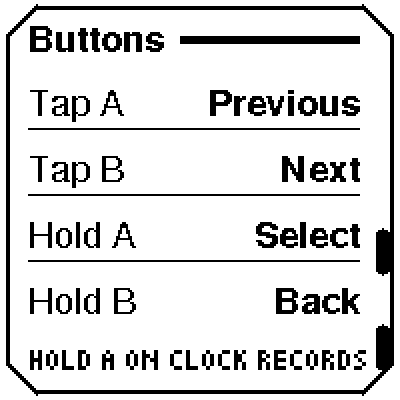
The whole gesture grammar is four things: tap A (previous), tap B (next), hold A (select), hold B (back). Every screen is built from those and nothing else.
Part 2 — What it actually does
The tag does the thinking
After recording you pick a tag — a second after speaking, while the intent is still fresh. That tag is the strongest signal in the whole system about what the note is for, so it selects the extraction prompt rather than just labelling the page.
| Tag | Becomes |
|---|---|
| Note | What was observed, and why it was worth saying |
| Idea | The idea, what it depends on, the next step |
| Task | Checkboxes, phrased as imperatives |
| Buy | A shopping list — things not bought yet |
| Work | Project, people, decisions, who committed to what |
| Expense | A ledger row: amount, merchant, payment method |
| Books | Quotes and learnings, filed per book |
"Get more cells" tagged Buy becomes a checklist item. The same words tagged Idea become a paragraph about battery capacity. Same transcript, different note, because you said which you meant.
Ask it things out loud
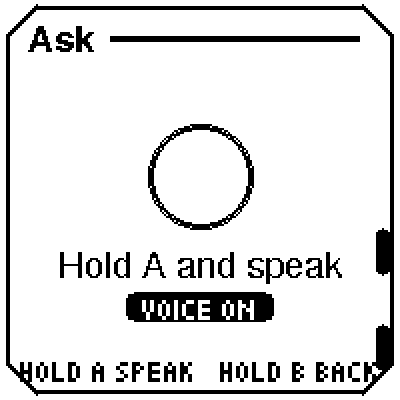
Hold A on the Ask screen, speak a question, and it is answered from your own notes and read back. Retrieval is hybrid — BM25 for proper nouns and part numbers, embeddings for paraphrase, merged with reciprocal rank fusion. Both matter: personal notes are full of project names and half-remembered ideas, and neither method handles both.
Expenses
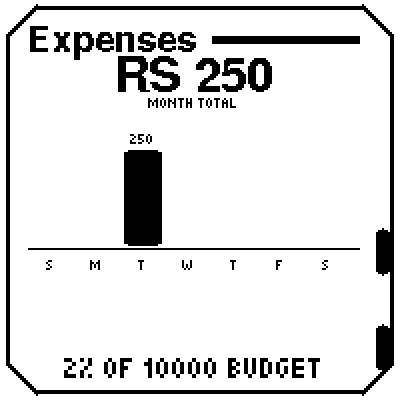
Say what you spent. It extracts amount, merchant, payment medium and what you got, writes it to a JSONL ledger inside the vault, and mirrors it to Notion — both ways, so I can correct a misheard amount from my phone and the ledger updates. The device shows the week as bars against a monthly budget.
Notes that follow on from each other
Say on Monday that an install is broken. Say on Thursday that you fixed it. Those are one story told twice, and filed as two unrelated pages the question "what was wrong with that install?" gets answered with Monday's note — correct about the past, wrong about now.
The old note is never edited. The two are linked, the earlier one is marked resolved with a forward link, and retrieval is told which is current:
Q: what was the issue with the ROS installation? A: The ROS2 installation on the Jetson was failing because the colcon build tool was missing and the apt repository key had expired. The issue was resolved on August 31st by re-adding the apt key and installing python3-colcon-common-extensions separately.
The data remains. The answer moves on.
Apps that appear when you plug hardware in
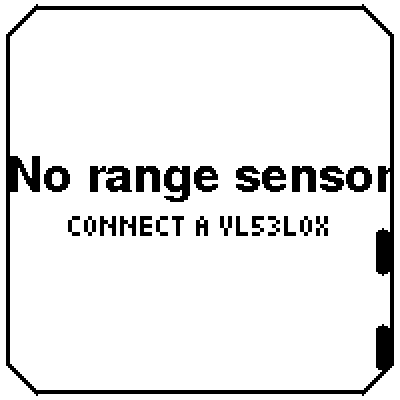
The I²C bus is probed at boot. Plug in an MPU6050 and a Dice app unlocks that you roll by shaking. Plug in a VL53L0X and it becomes a Measure — a laser tape measure with live distance, a freeze, and unit switching.
Apps whose hardware is missing are struck through rather than hidden. A menu that silently changes length is confusing; one where a row comes alive when you plug something in explains itself.
Part 3 — What the numbers actually said
Several things I was confident about turned out to be wrong, and only measurement caught them.
| What I assumed | What happened |
|---|---|
| Haptic pulses should be 10–60 ms, like the audio cues | Imperceptible. A motor is not a speaker — the eccentric mass takes tens of milliseconds to spin up. Correct values, found by sweeping on real hardware: 90 / 100 / 120 ms |
| The accelerometer reads 1.00 g at rest | 1.11 g. Ordinary uncalibrated scale error, and it varies per part — so shake thresholds are measured relative to rest when the screen opens, never hardcoded |
HTTPClient::setTimeout(120000) waits two minutes | It waits 54.4 s. The argument is a uint16_t, so anything over 65535 ms silently wraps. My "fix" of 180000 gave 48.9 s — shorter than what it replaced |
| A 5 mm repaint threshold suits the distance sensor | Pointed at a fixed target it returned 104–114 mm. A 5 mm threshold repaints constantly on a still object. 12 mm sits outside the noise |
base.en is good enough for short voice notes | It drops proper nouns and numbers — exactly the words a note is about. distil-large-v3 is within a point of large-v3 at ~6× the speed |
| Fuzzy-matching mis-heard shop names is safe | The correction that should happen (Chrome→Croma) scores 0.727. One that should not (Amazon→Amazon Pay) scores 0.750. The distributions overlap, so no threshold works — explicit aliases instead |
The one that mattered most
Asked "how much of my spending was on UPI versus card?" with the notes retrieved normally, qwen3:8b answered Card ₹3,347 against a true ₹2,448. It had added a category total to the very rows the total was of.
Told plainly in the prompt not to do that, it produced "₹2,448 (UPI) and ₹1,279 (cash) minus ₹799" — the same wrong answer, with its working shown.
You cannot prompt a small model out of an arithmetic error, because noticing the double-count is the same judgement it already failed. So the model no longer does sums at all. Every aggregate — total, per category, per medium, per merchant — is computed from the ledger and handed over as fact. The model picks a line and writes a sentence around it.
That pattern repeated across the whole project: when a model keeps getting something wrong, remove the task rather than rewording the instruction. The same fix applies to quote attribution in reading notes (a marker must appear in the transcript) and to payment methods (the transcript decides, not the model — it invented "Cash" for a note that named no method at all).
Part 4 — Things the hardware taught me
Only five GPIOs are free. The build uses octal PSRAM (PSRAM=opi), which claims 33–37 on top of the flash pins, native USB, and everything the panel, audio, SD and I²C already use. What is left: 1, 2, 3, 5, 7. The haptic motor took 3.
There is no user LED. Worth stating because it is the first thing you look for. The board has none that software can drive.
A GPIO cannot drive a motor. 40 mA absolute maximum against a vibration motor's 60–100 mA. The module needs its own transistor.
Whisper writes $320 when you say "three hundred and twenty rupees." Trusting that symbol would turn every rupee amount into dollars — so currency comes from spoken words only, and symbols are ignored outright.
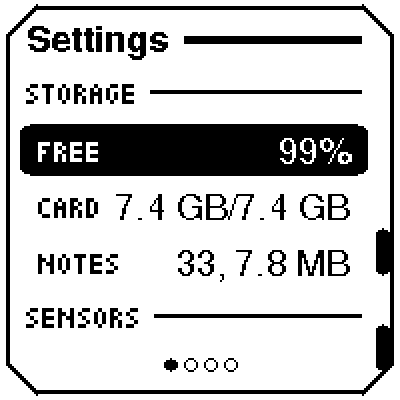
FreeSans9pt7b covers ASCII and nothing else. A middle-dot separator rendered as a blank — the Settings row read 33 7.8 MB with an unexplained gap. Invisible on the panel at arm's length; obvious the moment I captured a screenshot.
Part 5 — Every screen here is a real capture
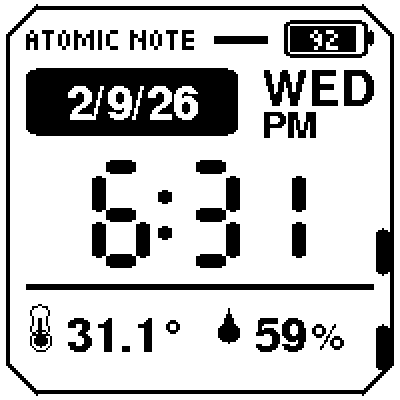
Photographing e-paper is a poor way to document a 200×200 layout — room lighting turns crisp 1-bit graphics grey and warped. So the firmware can dump its framebuffer over serial, and a host script decodes it to PNG:
./tools/screenshot.py          # every screen, into docs/screens/
./tools/screenshot.py ask dice # or just these
The device does its own navigating, so nothing needs pressing in the right order. That tooling sits behind a kDevTools flag that is off in release builds — a shipped device has no reason to dump its framebuffer on command, and gating it saves 2,244 bytes of flash.
It also caught the invisible separator above, which is the argument for it in one example: you cannot proofread a 200×200 panel by squinting at it.
What's next
A proper 3D-printed EDC enclosure, and magnetic snap-on sensor modules so sensors can be hot-swapped without wiring anything. The software side already supports it — the bus is probed at boot and apps appear on their own.
If you have thoughts on the modular connector design, the mechanical side, or a sensor worth supporting, I would like to hear them.
🗓️ Written 2026-09-06. Firmware, companion service and hardware notes are open source under MIT: github.com/atomicrajat/atomic-note
more in Embedded